






Skip to content
Development preview Software is not on sale yet
shopruno
Shape your brand, then put your team to work

Bring your idea. Or discover one with AI.

Start with a rough idea, a detailed plan, or a store you already run. Shape the brand yourself or choose paid AI guidance when available. Your confirmed blueprint becomes the context for your store’s operating team.

  • Plan before connecting Shopify
  • Manual or paid AI planning
  • Nothing ships without your approval
Choose your starting point

A rough thought is enough to begin.

You do not need a Shopify store to plan a brand. Your account saves your starting point; AI credits are purchased separately.

In development · AI uses separate credits

I have an idea

Bring your idea and shape the audience, offer and personality of your brand with your AI partner.

Shape my idea
In development · AI uses separate credits

Help me find one

Start with your interests, experience and goals. Explore possible directions before choosing the brand you want to build.

Explore brand ideas
In development · AI uses separate credits

I already run a store

Bring your existing brand and the goals you want to work on. Build on the identity, audience and products you already have.

Build on my store
The intended journey

One brief, carried into the work.

Steps one to three work today with manual planning. Hosted AI guidance, team provisioning and Shopify connection are in development. Confirmation saves a decision; it does not publish a store.

  1. Saved planning

    Explore

    Bring an idea or describe an existing store. When paid guidance is offered, a guide can propose directions with tradeoffs instead.

  2. Saved planning

    Refine

    Adjust audience, offer, voice and constraints. Assumptions and unanswered questions stay visible rather than being papered over.

  3. Saved planning

    Confirm

    Save an exact blueprint revision. It stays readable, editable and exportable whether or not you ever buy credits.

  4. In development

    Prepare

    In a ready destination, the coordinator turns the blueprint into bounded tasks and supported skills for your team.

  5. In development

    Connect and operate

    Authorize Shopify, review proposals and follow verified outcomes. Ownership, billing and launch remain explicit steps you take.

Sixteen stores, sixteen colours

Every kind of store has a story with an ending.

Each tile is one store: what it sells, a person using it, and what the team did for it. Hover to play. Tap for the receipt.

The sixteen stores and their receipts are examples drafted for these pages, not customers. Clips are generated. Real store evidence replaces them as the test store ships.

See all sixteen
The team

As many agents as your store needs. One rule: they propose, you approve.

Seven roles to start with. Each agent is a role, the skills it loads, the tools it may call and a model provider you choose, bound to one brand. Add more as the work grows. Meet the team

An East Asian woman in profile fastening a gold hoop earring against a solid deep green backdrop
HALO FINEBrand steward agent at work
In today's preview

Brand steward

Keeps every word and image inside the brand you defined.

Proposes
Identity drafts, voice edits, off-brand flags.
Boundary
Never rewrites the brand without you.
A laughing child mid-spin in a yellow hooded rain cape on a wet floor against a solid yellow backdrop
Kite & KinCatalog agent at work
In today's preview

Catalog

Sources, describes and prices products truthfully.

Proposes
Draft listings, price changes, supplier swaps.
Boundary
Never publishes a listing you have not seen.
A woman with bleached hair playing a vintage analogue synthesizer against a solid violet backdrop
STATICStudio agent at work
Not yet packaged

Studio

Turns your product photos into stills and short motion.

Proposes
Clips, posters, carousel cards.
Boundary
Never invents a product that does not exist.
A young Black man crouched tying a lime running shoe against a solid cobalt backdrop
STRIDE NINEAds agent at work
Not yet packaged

Ads

Runs campaigns across the channels you connected.

Proposes
Ad sets, budget shifts, pauses.
Boundary
Never spends past the cap you set.
A woman with silver-streaked hair pulling on an oxblood wool cardigan against a solid oxblood backdrop
MarrowSupport agent at work
Not yet packaged

Support

Reads the inbox and drafts honest, fast replies.

Proposes
Replies, refunds, returns.
Boundary
Never sends money or a message on its own.
A person switching off a lamp beside a small aquarium glowing blue against a solid deep teal backdrop
Bell JarFulfillment agent at work
Not yet packaged

Fulfillment

Turns paid orders into shipped orders with tracking.

Proposes
Exceptions a person should see.
Boundary
Never hides a late order.
A hand pouring red hot sauce onto a white plate beside a chili against a solid scorched red backdrop
Ember & AshAlmanac agent at work
Not yet packaged

Almanac

Plans the year from seasons and your own evidence.

Proposes
Campaign windows, prep lists.
Boundary
Never starts a campaign by itself.

Add an agent

Pick a role or write your own. Keep the skills you want. Choose the model provider. Bind it to a brand. Then add another.

Open the composer
How trust works

Propose, approve, execute, verify.

Anything touching money, a customer or the irreversible waits for you. Everything is written down before and after it happens.

A young Black man crouched tying a lime running shoe against a solid cobalt backdrop
STRIDE NINEThe ad set that went live used this clip
  1. Proposed · Ads agent

    An ad set for Stride Nine with three angles, under the cap you set.

  2. Approved · You

    You read the exact creative and the budget, and said yes.

  3. Executed · Ads agent

    The set went live on the channels you connected. Nothing else moved.

  4. Verified · Ledger

    Spend, reach and the receipt recorded, so you can inspect it later.

One login, every brand

Switch brands. Everything switches with you.

Each brand keeps its own identity, agents, budgets, permissions and history, and actions and spending always target the brand you are looking at. Switch stores from the corner, open the queue, and approve the proposal that is waiting. How brands stay apart

Kite & Kin · Overview

Next useful action
Approve 1 proposal
Catalog agent is waiting for your decision.
Brand plan
Reviewed
Reviewed
3 of 3 steps
Shopify connection
Connected
Connected
12 products in the catalog snapshot
The team
4 agents
1 waiting
Catalog, Brand steward, Support, Studio
Catalog agent proposed
Twelve product pages from one photo shoot.
Waiting for you

Read the shoot folder and the size chart, wrote twelve pages with the same voice and the right sizes.

  1. Proposed
  2. Approved by youWaits for you.
  3. Executed
  4. Verified
Recent activity
Every action, before and after it happens.
WhoWhatState
CatalogTwelve product pages from one photo shoot.proposed
SupportA size reply for a tall four-year-old, from the size chart.drafting
Brand stewardIdentity locked by youverified
YouBrand plan reviewedsaved
Your store's saved work and decisions. Approval is always a separate step. Illustrative store; nothing is published.

A design, built from the same shadcn/ui parts as today's preview. The real screens are below, under "What is real today".

Own it

Choose where your team runs.

Self-hosted software puts installation and provider accounts in your hands. Planned managed hosting adds installation, monitoring, backups and updates as a separate recurring service. Neither choice replaces your Shopify subscription.

A founder's desk at dusk with a laptop and monitor showing a dark operations dashboard with a queue of pending itemsIllustrative
A woman at a kitchen table in morning light, coffee in hand, watching a progress bar fill on a laptopIllustrative
Guided deployment
Your installation, step by step
  1. Host provisionedyour account
  2. Version 0.0.8 installedverified package
  3. First owner createdyou
  4. Shopify connectedconnecting
  5. Team readynext
Design of the guided setup. Today's installation is a Linux lab package; the customer path is package 4 on the roadmap.
First

Confirm your blueprint

Keep your audience, positioning, voice and first goals together. Planning can begin before you have a Shopify store.

Then

Choose your destination

Self-host with a supported model connection, or choose managed hosting when offered. Software, hosting and AI allowances are separate.

Finally

Connect Shopify and meet the team

Authorize the intended Shopify store and review the team’s first tasks. Confirmation begins permitted preparation, not automatic publication.

What is real today

Every release carries its evidence.

The stores and the workspace above are designs. These are not: real screens from the development preview, and the release notes that say exactly what has been demonstrated. All documentation

No release documentation is available yet.
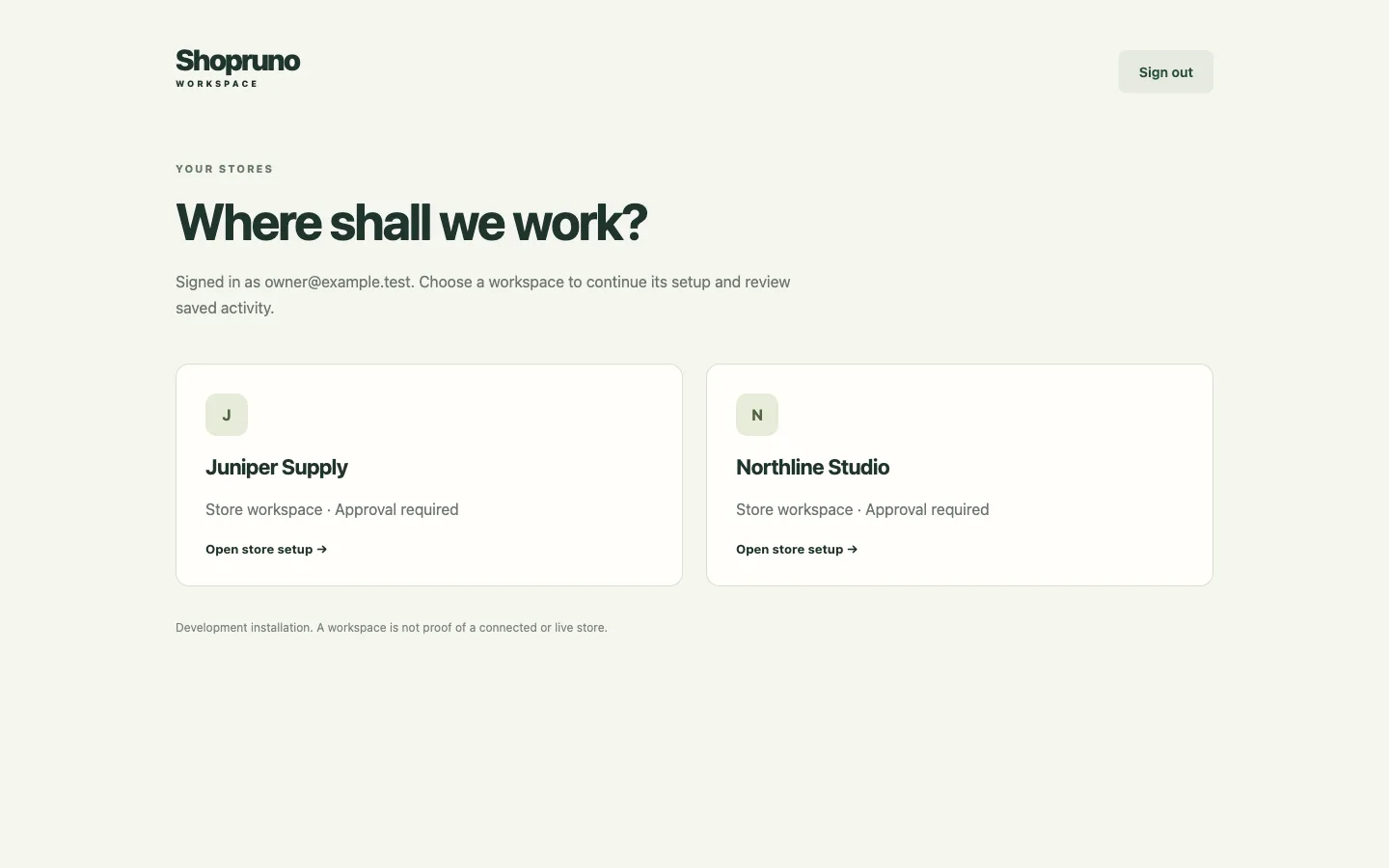
The store picker: two store cards, Juniper Supply and Northline Studio, under the heading Where shall we work?
Pick a storePreview · 10 Sep 2026
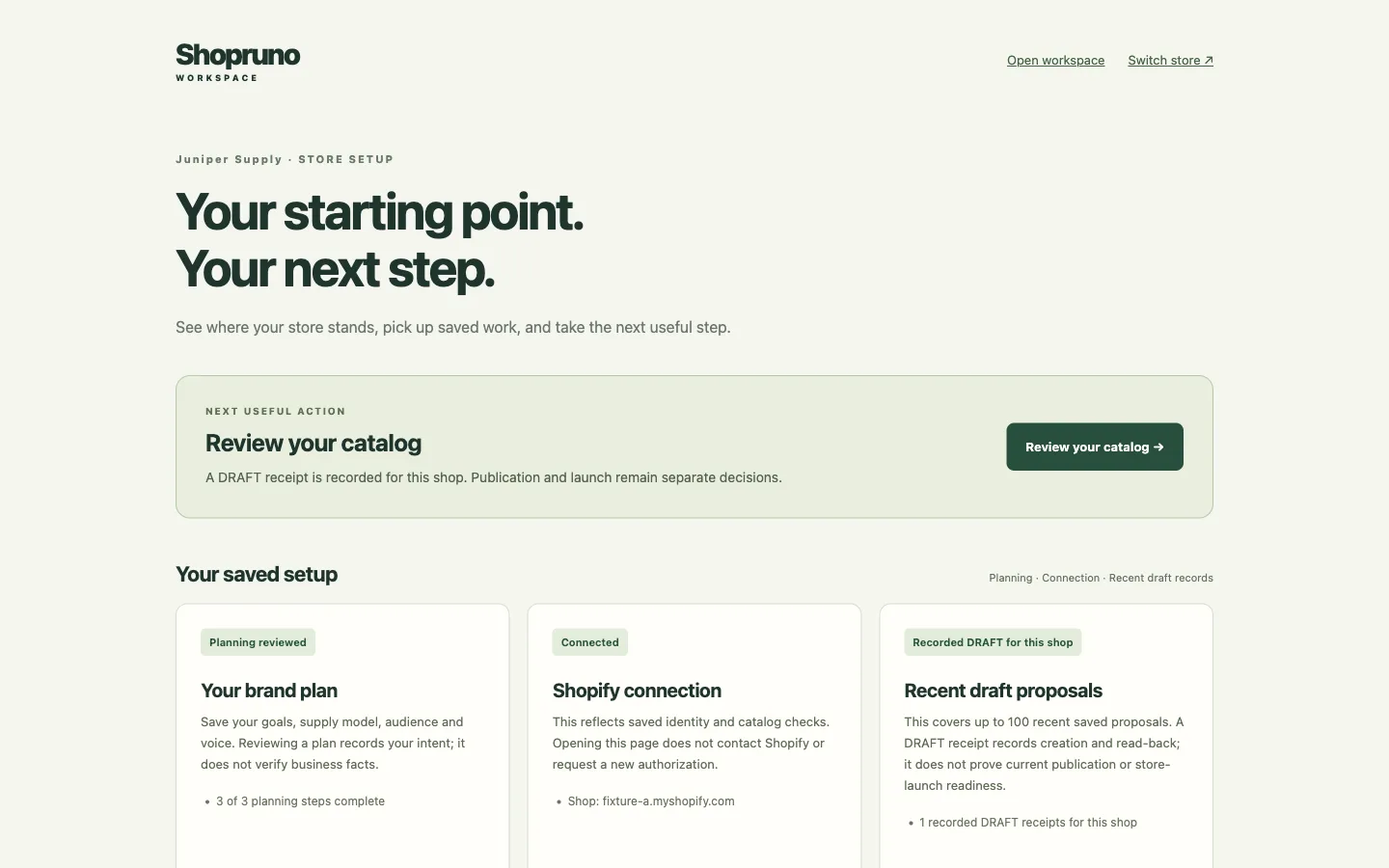
A store setup page with a next useful action and three cards: brand plan reviewed, Shopify connected, one draft recorded
See where a store standsPreview · 10 Sep 2026
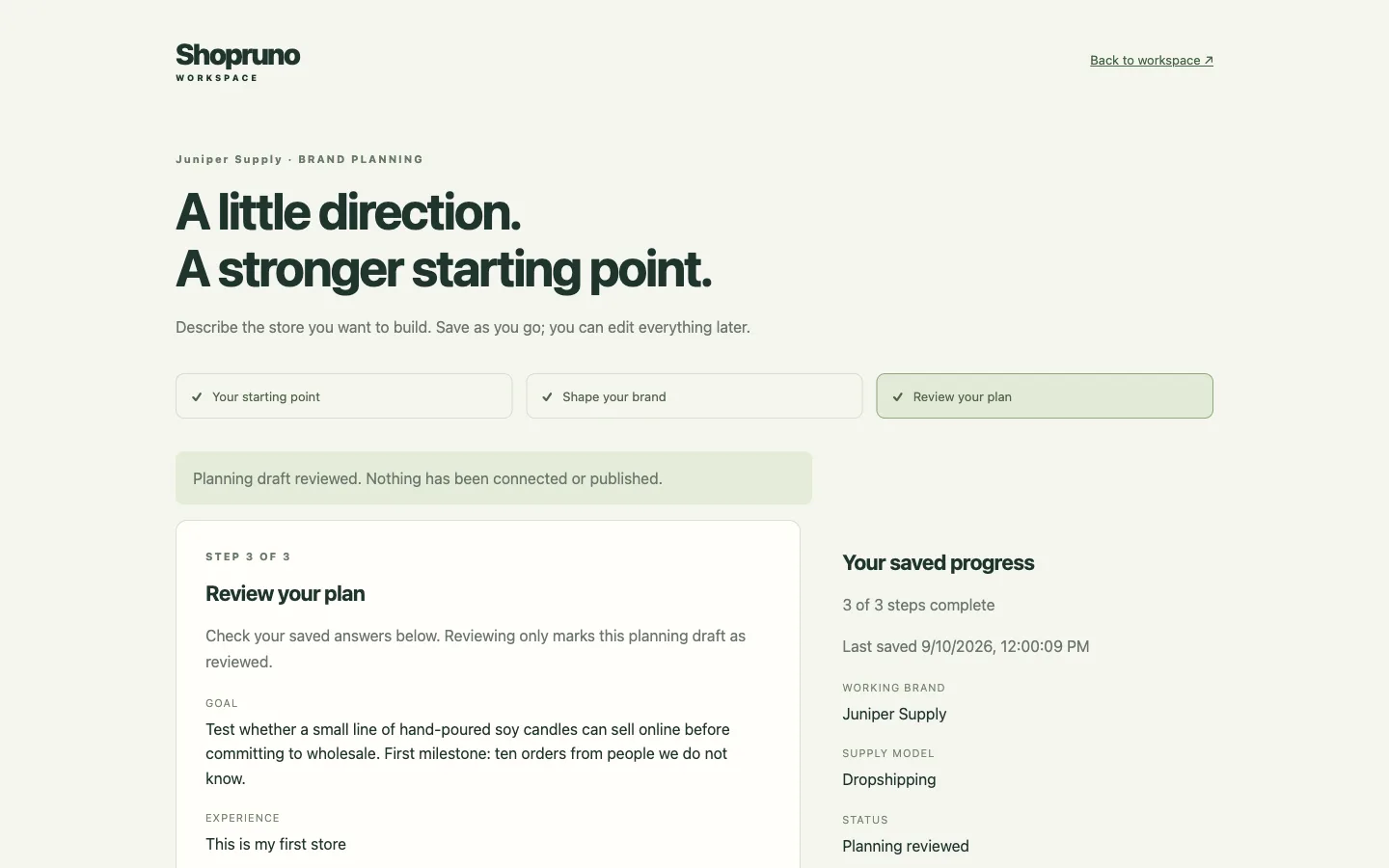
Brand planning, step three of three: the saved goal, experience, business model, brand name, audience and voice ready to be marked reviewed
Plan the brandPreview · 10 Sep 2026
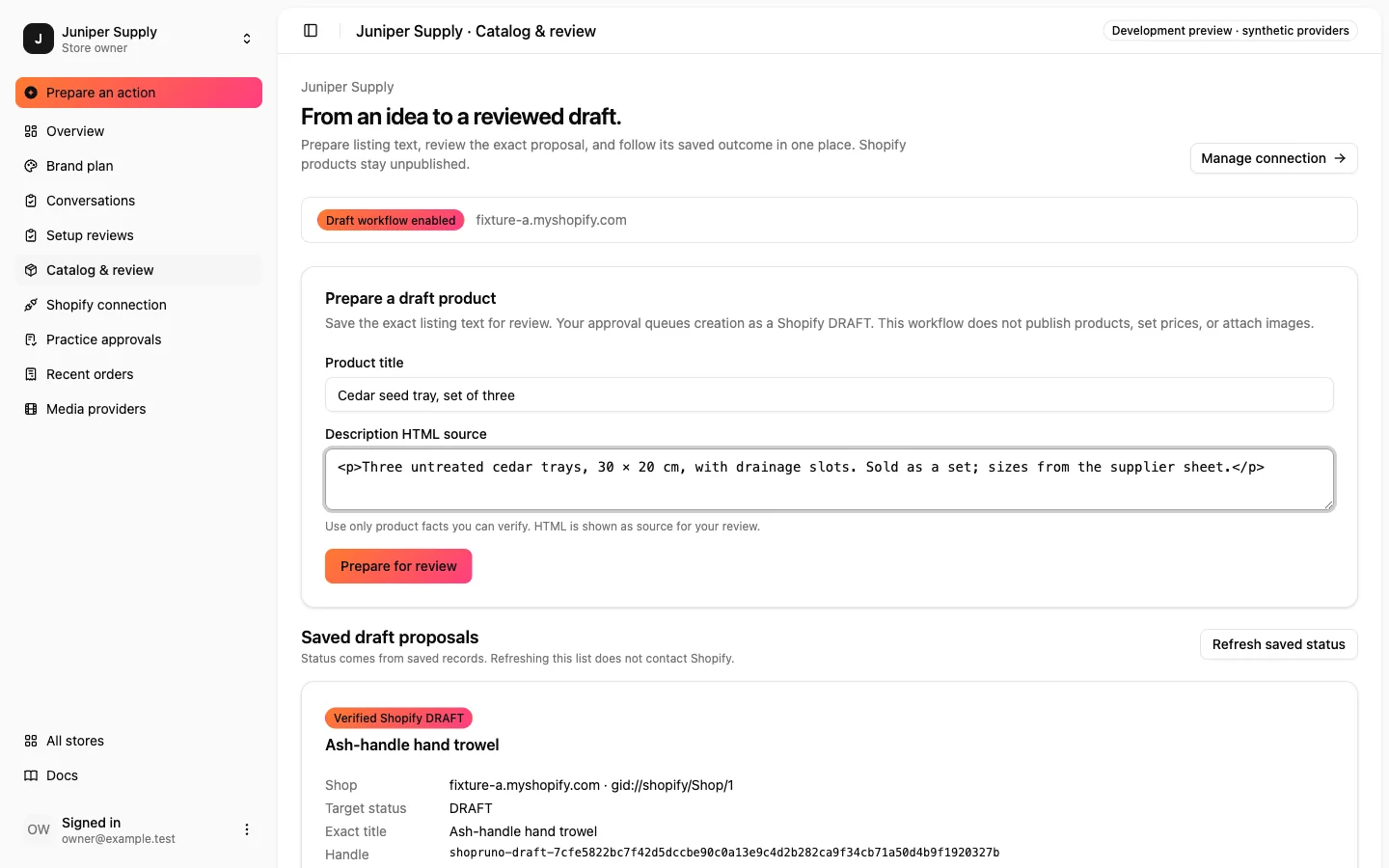
The Catalog & review page with a draft product form filled in: an exact title, the description HTML source and a Prepare for review button
Write the exact textPreview · 13 Sep 2026
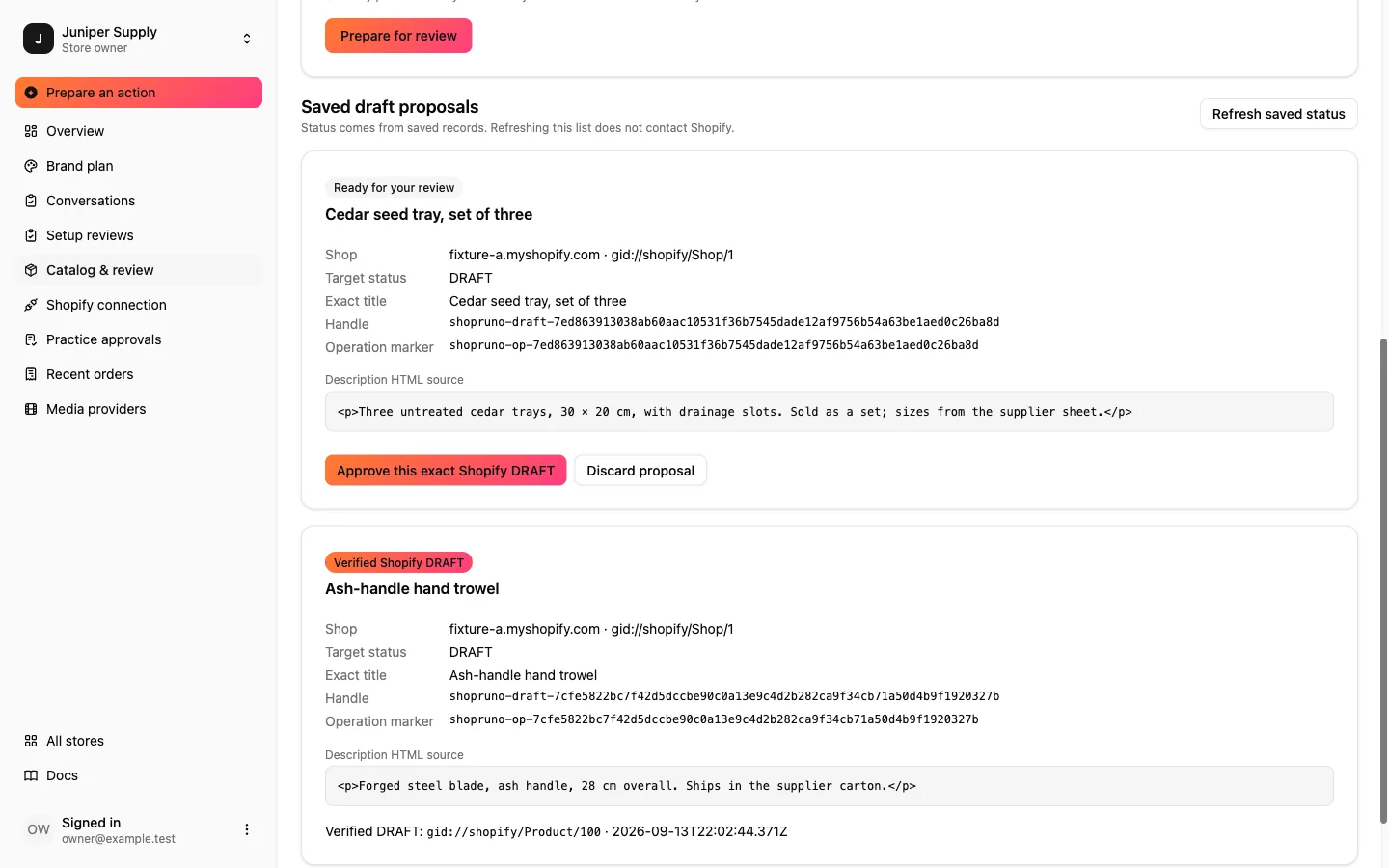
A saved draft proposal marked Ready for your review, showing the exact title, handle, operation marker and description, with buttons to approve this exact Shopify DRAFT or discard the proposal
Approve exactly thisPreview · 13 Sep 2026
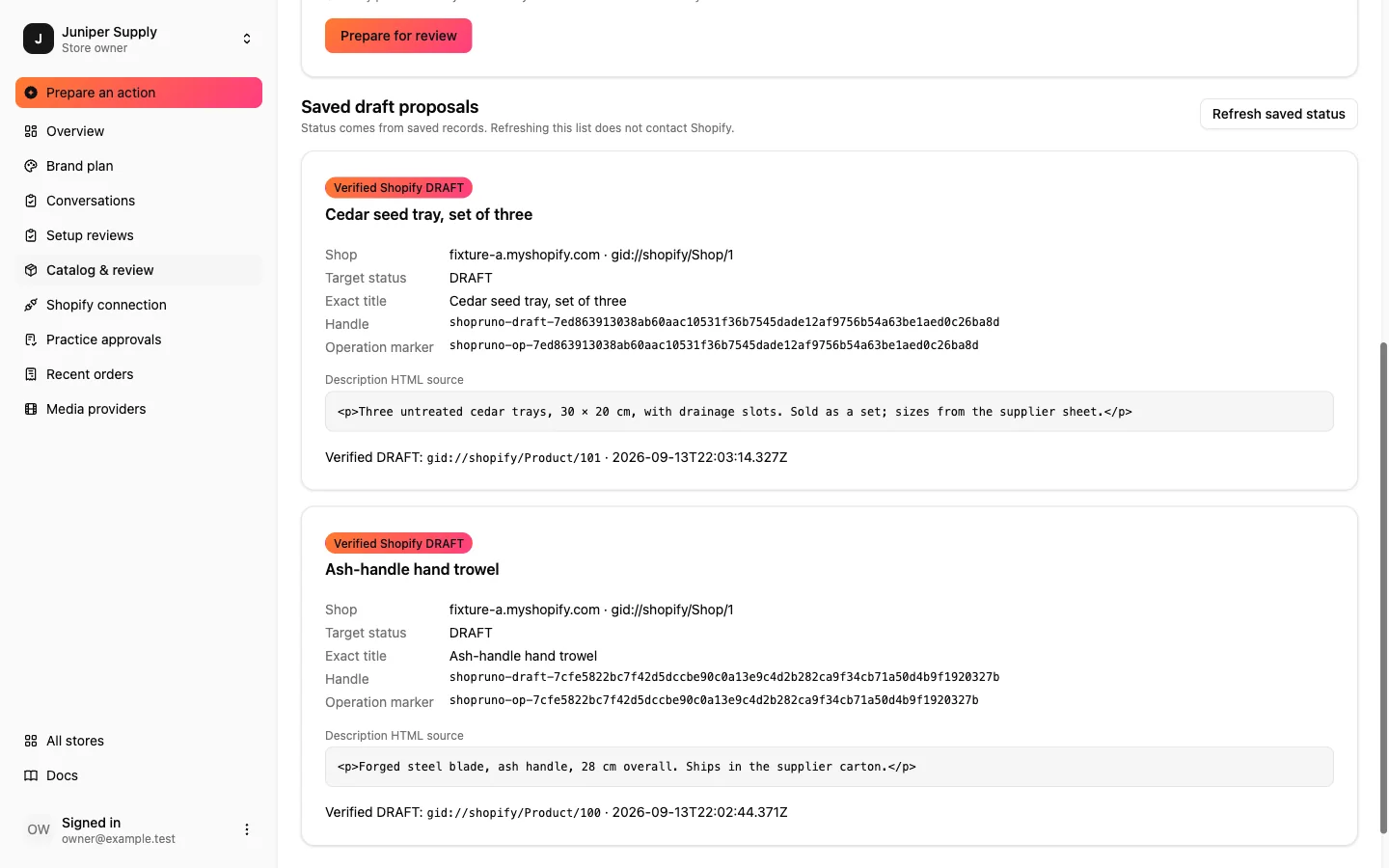
The same proposal marked Verified Shopify DRAFT, with the product id and timestamp read back from Shopify
Read it back verifiedPreview · 13 Sep 2026

Screens captured from the development preview in September 2026; each card carries its capture date. The workspace is synthetic: two stores, one owner, a synthetic Shopify. Store and product names are placeholders.


Start with one brand. Keep the login for all of them.

Start a brand