Brand stewardAnthropic · 3 skillsThe one who remembers who you are.
 Illustrative
The team
From your idea to your operating team.
An onboarding guide helps refine your brief. After you confirm it, the planned coordinator hands bounded tasks to specialists with shared brand context. You assign skills and review progress; permissions and spending remain separate controls.
ProposedApproved by youExecutedVerified
In today's previewRuns in the development preview. Provider operation is synthetic until release.
Not yet packagedBuilt, but not yet packaged for your installation. Packaging is in progress.
PlannedDesigned and agreed, not yet built.
CatalogOpenAI · 2 skillsTruthful listings, priced to your floor.
AdsGoogle · 4 skillsSpends what you allow. Not a cent more.
The intended journey
One approved brief. Clear responsibility for every task.
Steps one to three work today with manual planning. Hosted AI guidance, team provisioning and Shopify connection are in development. Confirmation saves a decision; it does not publish a store.
- Saved planning
Explore
Bring an idea or describe an existing store. When paid guidance is offered, a guide can propose directions with tradeoffs instead.
- Saved planning
Refine
Adjust audience, offer, voice and constraints. Assumptions and unanswered questions stay visible rather than being papered over.
- Saved planning
Confirm
Save an exact blueprint revision. It stays readable, editable and exportable whether or not you ever buy credits.
- In development
Prepare
In a ready destination, the coordinator turns the blueprint into bounded tasks and supported skills for your team.
- In development
Connect and operate
Authorize Shopify, review proposals and follow verified outcomes. Ownership, billing and launch remain explicit steps you take.
Model providers
Any model. Your key. Your bill.
Use a supported provider adapter in your installation. The current runtime uses one configured model per store; per-agent provider choice is a design preview.
 AnthropicClaudeHosted API
OpenAIGPTHosted API
 GoogleGeminiHosted API
 MistralMistralHosted API
 MetaLlamaOpen weights
 DeepSeekDeepSeekOpen weights
 xAIGrokHosted API
 AlibabaQwenOpen weights
 MoonshotKimiHosted API
 MiniMaxMiniMaxHosted API
 BaiduERNIEHosted API
CohereCommandHosted API
 PerplexitySonarHosted API
 NVIDIANIMHosted APIAnthropicClaudeHosted API
OpenAIGPTHosted API
GoogleGeminiHosted APIMistralMistralHosted APIMetaLlamaOpen weightsDeepSeekDeepSeekOpen weightsxAIGrokHosted APIAlibabaQwenOpen weightsMoonshotKimiHosted APIMiniMaxMiniMaxHosted APIBaiduERNIEHosted APICohereCommandHosted API
PerplexitySonarHosted APINVIDIANIMHosted APIGroqFast inferenceHosted API
CerebrasFast inferenceHosted API
TogetherOpen modelsGateway
FireworksOpen modelsGateway
 OpenRouterAny modelGateway
 ReplicateAny modelGateway
 ModalYour deploymentGateway
 Hugging FaceInferenceGateway
AzureOpenAI ServiceGateway
AWSBedrockGateway
 Google CloudVertex AIGateway
 OllamaLocalOn your hardware
 vLLMLocalOn your hardware
 LM StudioLocalOn your hardware
GroqFast inferenceHosted API
CerebrasFast inferenceHosted API
TogetherOpen modelsGateway
FireworksOpen modelsGateway
OpenRouterAny modelGatewayReplicateAny modelGatewayModalYour deploymentGatewayHugging FaceInferenceGatewayAzureOpenAI ServiceGateway
AWSBedrockGateway
Google CloudVertex AIGatewayOllamaLocalOn your hardwarevLLMLocalOn your hardwareLM StudioLocalOn your hardware- Interface
- Any OpenAI-compatible chat endpoint, reached over a private socket. No provider is bundled or endorsed.
- Per agent
- Different agents can run on different providers. The preview runs one explicit model per store, synthetic inference.
- Billing
- By the provider, at their rates, to you. Your key never enters an agent's container.
How an agent is made
A role. Its skills. Its tools. A model. One brand.
Five choices, one card. Add it to a brand, then add another. There is no fixed number.
01RoleSeven to start with, or one of your own.
02SkillsPlaybooks the agent loads. Keep the ones you want.
03Model providerSelf-hosted design preview. Per-agent provider selection is planned.
04BrandBound to one brand. Its keys, its budget, its history.
05How far it may actStarts at Propose. Earns Act within limits per domain; you can pull it back.
06What the team getsThe card is the agent: what it reads, what it may propose, what it can never do on its own.
Kite & KinAgent · Propose
Anthropic · Claude
Catalog
2 skills
Sources, describes and prices products truthfully.
Skills
- Product listing
- Catalog visibility audit
Reads
- shopify.products
- supplier.sheet
- inventory.low
Proposes
- catalog.draft
- catalog.launch
Executes
Nothing on its own. Ever.
BoundaryNever publishes a listing you have not seen.
Your API key.
The team for Kite & Kin0 agents
Nobody yet. Add the first one above, then keep going. There is no cap.
The composer is a design preview. Today's runtime sets one model and its tools per store from configuration; adding a specialist is adding an entry, not a rebuild.
Seven starting roles
Start here. Add from here.
Each starting role watches one part of your store, proposes the next piece of work, and waits. Each card says what runs in today's preview and what is still being packaged.
In today's preview
Brand steward
The one who remembers who you are.
Keeps every word and image inside the brand you defined.
- Reads
- Your brand definition, every draft before it ships.
- Proposes
- Identity drafts, voice edits, off-brand flags.
- Connects to
- Nothing external. It only reads your own brand.
- Boundary
- Never rewrites the brand without you.

In today's preview
Catalog
Truthful listings, priced to your floor.
Sources, describes and prices products truthfully.
- Reads
- Supplier sheets, your margins, the live catalog.
- Proposes
- Draft listings, price changes, supplier swaps.
- Connects to
- Shopify Admin, your suppliers.
- Boundary
- Never publishes a listing you have not seen.

Not yet packaged
Studio
Your photo, moving. Nothing invented.
Turns your product photos into stills and short motion.
- Reads
- Your product photos, the brand mark, owned music.
- Proposes
- Clips, posters, carousel cards.
- Connects to
- Image and video providers, under a credit ceiling you set.
- Boundary
- Never invents a product that does not exist.

Not yet packaged
Ads
Spends what you allow. Not a cent more.
Runs campaigns across the channels you connected.
- Reads
- Approved creative, spend, reach, tagged orders.
- Proposes
- Ad sets, budget shifts, pauses.
- Connects to
- Meta, TikTok and the other channels you connect.
- Boundary
- Never spends past the cap you set.

Not yet packaged
Support
Honest, fast, and always signed off by you.
Reads the inbox and drafts honest, fast replies.
- Reads
- The support inbox, orders, tracking records.
- Proposes
- Replies, refunds, returns.
- Connects to
- Your support mailbox, Shopify orders.
- Boundary
- Never sends money or a message on its own.

Not yet packaged
Fulfillment
Paid becomes shipped, and you see the exceptions.
Turns paid orders into shipped orders with tracking.
- Reads
- Paid orders, supplier status, carrier tracking.
- Proposes
- Exceptions a person should see.
- Connects to
- Shopify orders, your suppliers and carriers.
- Boundary
- Never hides a late order.

Not yet packaged
Almanac
Plans the year from your own evidence.
Plans the year from seasons and your own evidence.
- Reads
- Last year's orders, the catalog, the calendar.
- Proposes
- Campaign windows, prep lists.
- Connects to
- Nothing external. It reads your own history.
- Boundary
- Never starts a campaign by itself.

Skills
A skill is a playbook.
What to read, what to check, what to propose, where to stop. Four steps, every time.
- 1ReadThe supplier sheet, your margin floor, the brand voice you locked.
- 2CheckEvery field against the identity. Prices against the floor. Nothing invented.
- 3ProposeA complete draft listing: copy, variants, prices, feed fields, alt text.
- 4StopLeaves it DRAFT and waits. It never publishes what you have not seen.
Every skill follows that shape. An agent loads the ones you keep, and the operating agent can learn new ones from its own runs, inside the same gates.
In today's preview
- Brand guardCheck every draft against the identity you locked; flag what drifts.
- Setup reviewExplain a saved setup review from its exact saved facts. No tools, no actions.
Not yet packaged
- Product listingTurn a raw supplier import into a complete, on-brand draft listing: copy, variants, prices, feed fields, alt text. Leaves it DRAFT.
- Catalog visibility auditCheck how the live catalog appears in AI shopping surfaces and prepare evidence for repair.
- Social creativeCompose a promo image around the real product photo, draft the caption, propose the post.
- Social video directorProduct-video concepts and review packets for TikTok, Reels and Shorts. Stops at every spend and publish gate.
- Meta publishPublish an approved post to a Facebook Page. Only on approval, never on its own.
- Campaign composerAngles, budgets and channel variants under the cap you set; pauses and shifts as proposals.
- Support triageRead the inbox, look up the order and the tracking record, draft the honest reply.
- Order exceptionsPaid becomes shipped with tracking; the late, the odd and the high-value are flagged for you.
- Season planningA calendar of what to prepare and when, from last year's orders and this year's catalog.
Planned
- Your own playbookA skill file you write for work only your store has. Same gates, same ledger.
Earned autonomy
Trust is granted one domain at a time.
No agent starts with authority. Each domain earns its rung as it proves itself, and you can pull any of it back.
DomainObserveProposeAct within limitsToday
CatalogEarned Act for price fixes under $5.
StudioEvery render is a proposal with a ceiling.
AdsBudgets and pauses wait for you.
SupportDrafts replies; you send them.
FulfillmentTracking writes run; refunds wait.
AlmanacReads and reports. Nothing changes.
Click a dot. Any rung, any domain, any time. Pulling back drops it on the spot.
- Observe
Reads, watches and reports. The daily brief starts here. Nothing changes.
- Propose
Drafts the work and waits. Anything touching money, a customer or the irreversible lives here until you say otherwise.
- Act within limits
Reversible, capped actions run on their own, one domain at a time, only after that domain has earned it. You can pull it back any time.
Approval, as it runs today
Write it. Approve exactly it. Read it back.
Real screens from the current development preview, in order: the exact text you prepare, the proposal that waits for your approval, and the DRAFT read back from Shopify with its receipt.
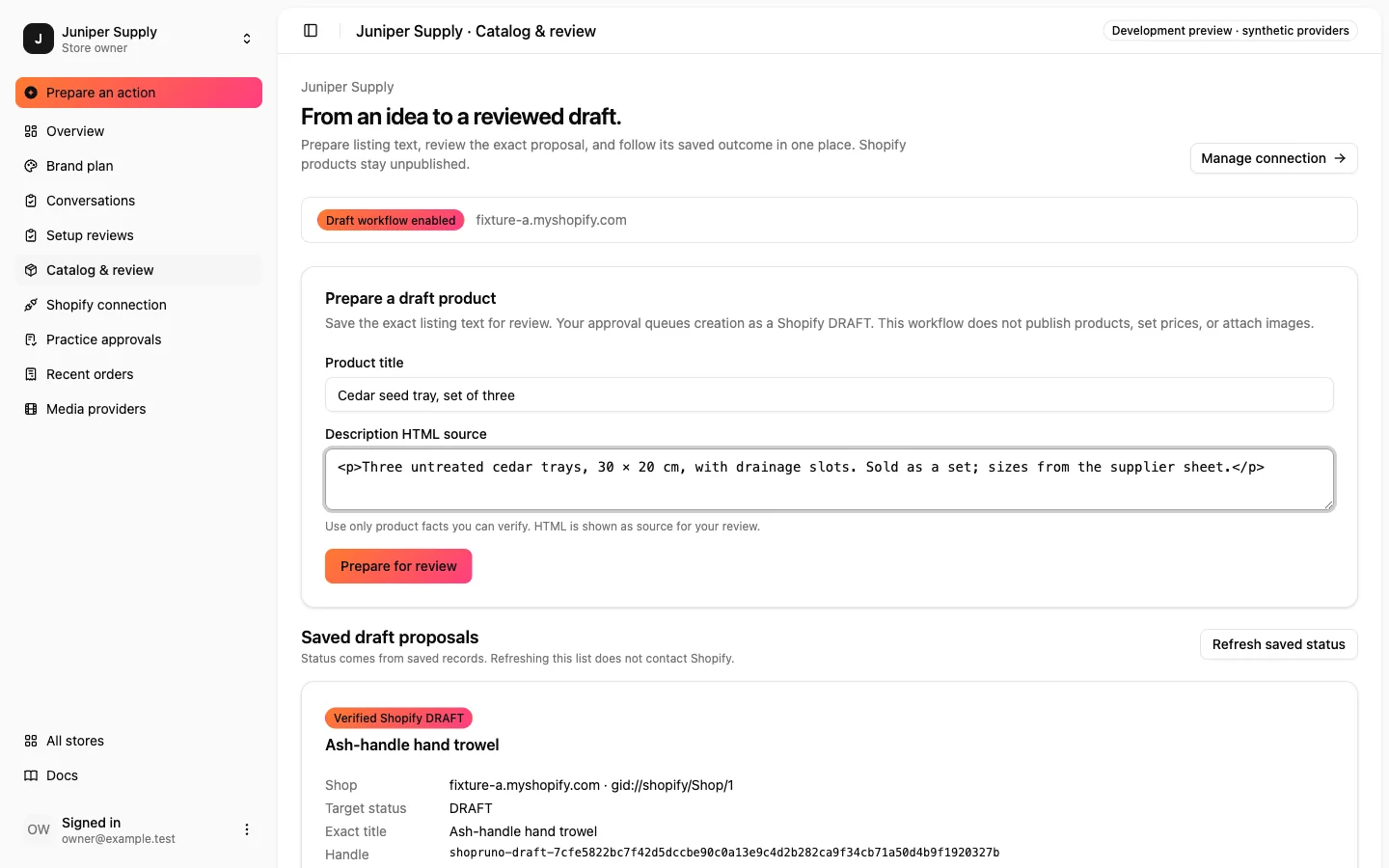 Preview · 13 Sep 2026
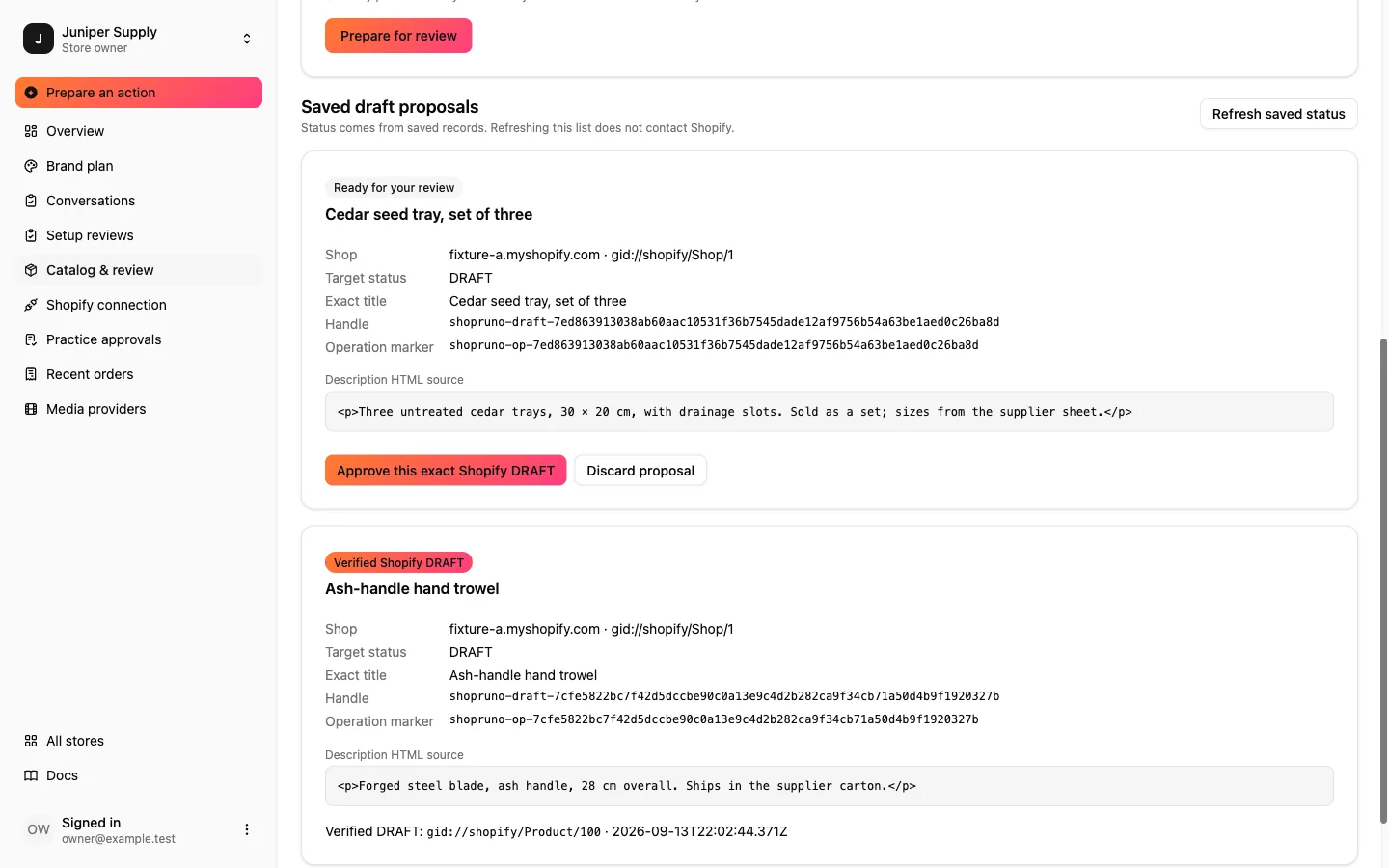 Preview · 13 Sep 2026
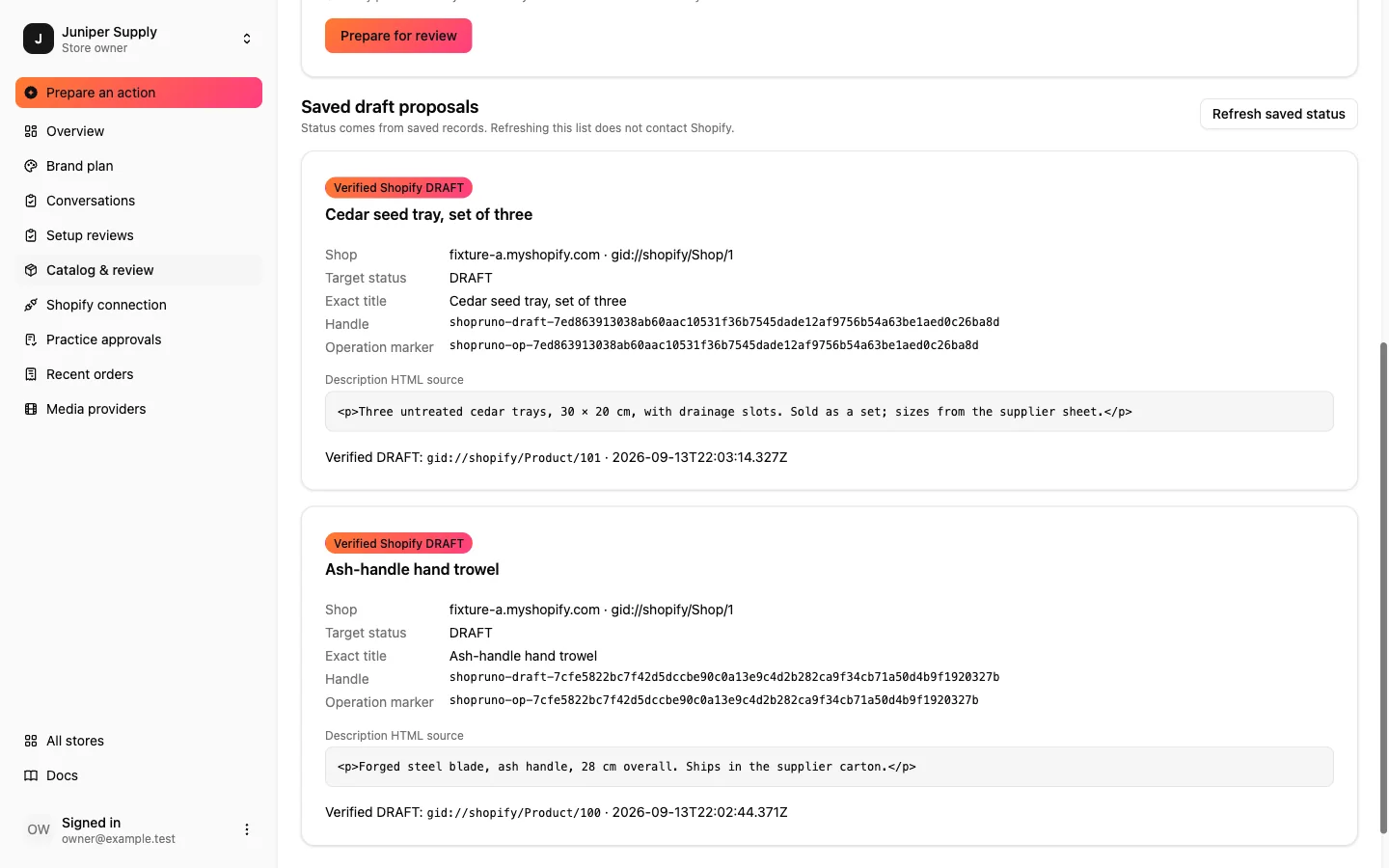 Preview · 13 Sep 2026
Screens captured from the development preview in September 2026; each card carries its capture date. The workspace is synthetic: two stores, one owner, a synthetic Shopify. Store and product names are placeholders.
Your assistant
Ask the store. Get an answer with a next step.
A chat that knows your brand, your Shopify admin and your storefront, and turns a question into work for the team. Same permissions, same approvals, same ledger.

You
Is the new shade ready to launch?
Assistant · Cinder
Open the ad set proposalAn example exchange about one of the sixteen stores.Almost. The listing is approved and live, the clip is rendered and waiting for your fidelity review, and the ad set is waiting for your approval. Nothing has spent yet.